Outsourcing IT support is the decision almost every growing business eventually faces. The office printer's on its fourth "call IT" sticky note this week, someone's laptop won't connect to the VPN, and the person who usually fixes this stuff is on leave. Nobody's covering it. That's usually when the question stops being a hypothetical and starts being urgent.
Why Businesses Start Outsourcing IT Support
Most businesses don't plan to end up managing their own IT badly. It just happens. Someone technical on staff picks up the slack early on, and by the time the company's grown, that person is fighting fires instead of doing their actual job.
A few signs it's time to look at outsourcing:
- The same person is both your "IT guy" and your accountant, office manager, or sales lead.
- Problems get fixed reactively — after something breaks, not before.
- Nobody's watching your systems overnight or on weekends.
- You've had a security scare, or you're not sure you'd know if you had one.
- New hires wait days for laptops and logins to actually work.

What Outsourcing IT Support Actually Means
Outsourcing IT doesn't mean handing over a set of passwords and hoping for the best. A proper managed IT arrangement covers the boring, essential stuff that keeps everything running, plus someone to call when it doesn't.
- Monitoring. Someone's watching your servers, endpoints, and network around the clock — not just when there's a problem.
- Patching. Software updates and security patches get applied on a schedule, not whenever someone remembers.
- Helpdesk. A real person answers when a laptop won't boot or an app won't open, and actually fixes it.
- Backup and recovery. Data gets backed up properly, and — just as important — those backups get tested so they actually work when you need them.
- Security. Firewalls, endpoint protection, and threat monitoring, ideally handled by people who've dealt with real incidents.
So the point isn't just fixing things faster. It's that most of these problems get caught before your team even notices something was wrong.
The Real Cost Comparison
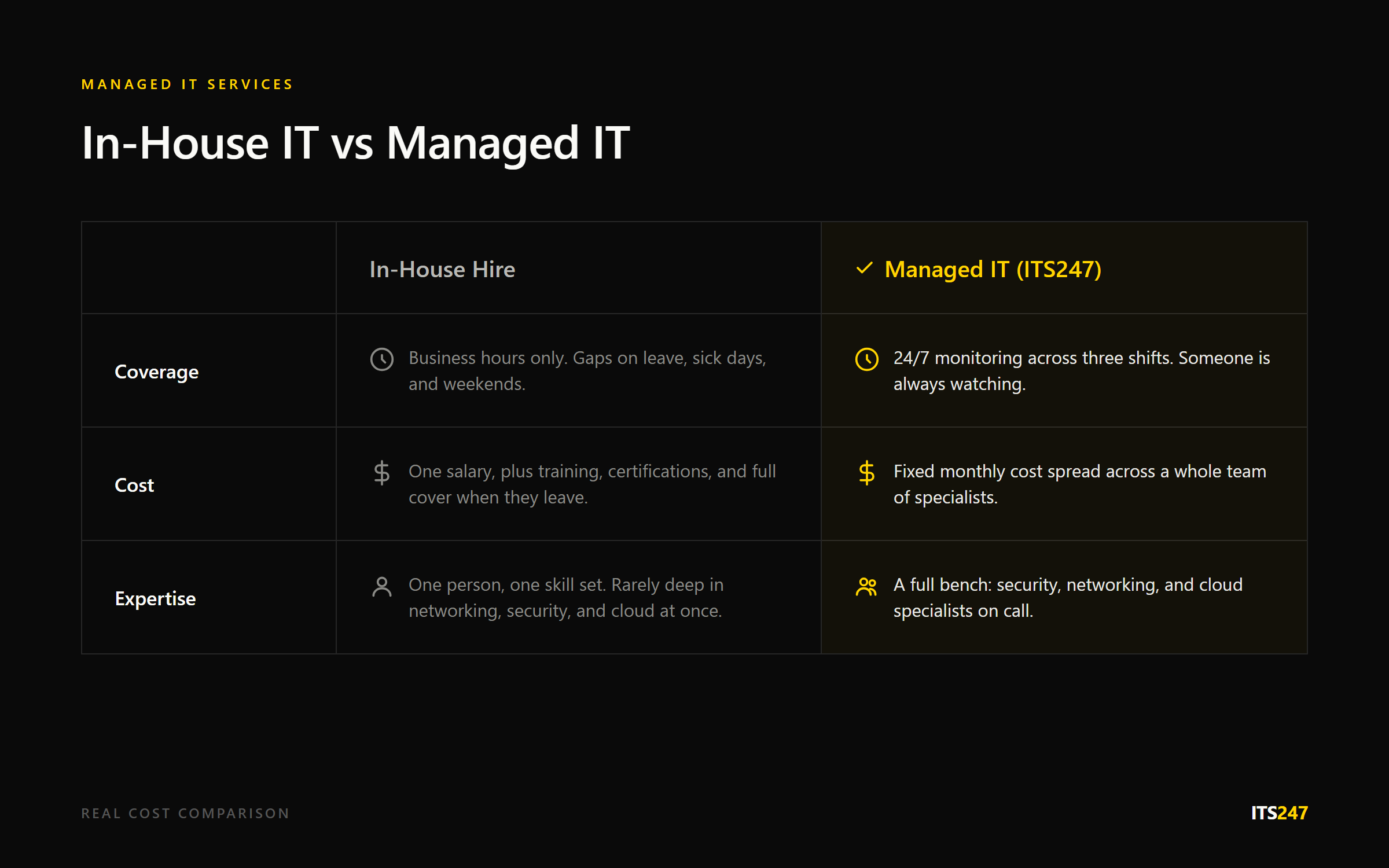
Hiring one in-house IT person sounds cheaper on paper than a managed services contract. It usually isn't, once you count everything.
- One person can't cover 24/7. They take holidays, get sick, and sleep at night — which means gaps.
- A single hire rarely has deep expertise in networking, security, and cloud all at once. You end up needing more than one person anyway.
- Training and certifications cost money and time, and they need refreshing as threats change.
- When that one person leaves, you're stuck with zero coverage while you hire again.
A managed IT provider spreads that cost across a team of specialists and a rotation that never sleeps. You're not paying for one person's skill set — you're paying for a bench of them.
What to Ask Before You Sign With Anyone
Not every managed IT provider works the same way, and the differences matter more once something actually goes wrong. Before committing, ask:
- What's your actual response time, and is it in writing as part of the agreement?
- Who answers the phone at 2am — a real engineer, or a call centre reading from a script?
- Do you test your clients' backups, or just run them and assume they're fine?
- Will the same people know our setup each time, or do we get a different technician every call?
- What happens if we outgrow the plan we start on — is there a clear next step?
A provider that hesitates on any of these is telling you something. The good ones answer without flinching, because they already track this stuff for their own reporting.
What Switching Actually Looks Like
A lot of businesses put off outsourcing because they picture weeks of downtime while someone pokes around their systems. In practice, a decent provider starts with an audit, not a shutdown.
- Week one: mapping what you actually run — hardware, software, logins, and who has access to what.
- Week two: a written baseline of gaps and risks, so you know exactly what you're dealing with before anything changes.
- After that: a staged rollout with change windows and a rollback plan, so nothing gets switched over without a way to undo it if something goes wrong.
Your team keeps working the whole time. The goal is a handover nobody notices, not a disruption everyone remembers.
Security Is the Part Businesses Underrate
A lot of businesses think about outsourcing IT purely in terms of "who fixes my laptop." But the security side is where the risk actually sits. Ransomware, phishing, and basic misconfigurations take down small businesses every week — often ones that assumed they were too small to be a target. The Australian Cyber Security Centre's threat reporting backs this up: small and medium businesses get targeted just as often as large ones.
A decent managed IT provider treats security as part of the job, not an upsell. That means active threat monitoring, tested backups, and someone who can walk you through frameworks like the Essential Eight if you ever need to prove your security posture to a client, insurer, or regulator — and if you need it formalised, our compliance and audit team can take it from there.

Making the Call on Outsourcing IT Support
You don't need to overhaul everything on day one. Most businesses start with an audit — a straightforward look at what's actually running, what's exposed, and what's fragile. From there, you can decide what to hand off first: helpdesk, security, backups, or all of it.
Overall, the businesses that get the most out of outsourcing IT support are the ones that stop treating it as a cost to minimise and start treating it as the thing that keeps everything else running. Downtime is expensive. A missed ransomware warning is worse. Because of that, paying a team to watch for both, every hour of every day, tends to pay for itself the first time something almost goes wrong.
Frequently Asked Questions
Is outsourcing IT support cheaper than hiring in-house?
Usually yes, once you account for 24/7 coverage, specialist skills, and the gap left when a single in-house hire is away or leaves.
Will we lose control over our own systems?
No — a good provider works with your existing setup and gives you visibility through reporting, not a black box you can't see into.
What size business actually needs managed IT?
Any business relying on computers, email, or cloud tools daily benefits, but it becomes essential once you have more than a handful of staff or handle sensitive data.
How fast should a managed IT provider respond to issues?
Response times should be written into the agreement, not left as a vague promise — ask for the actual number before signing.
Can we outsource just part of our IT, like security or backups?
Yes, most providers let you start with one area and add others later as you're ready.
What's the first step if we're considering outsourcing?
Start with an IT audit to see what you're running, what's exposed, and where the biggest risk actually sits.